
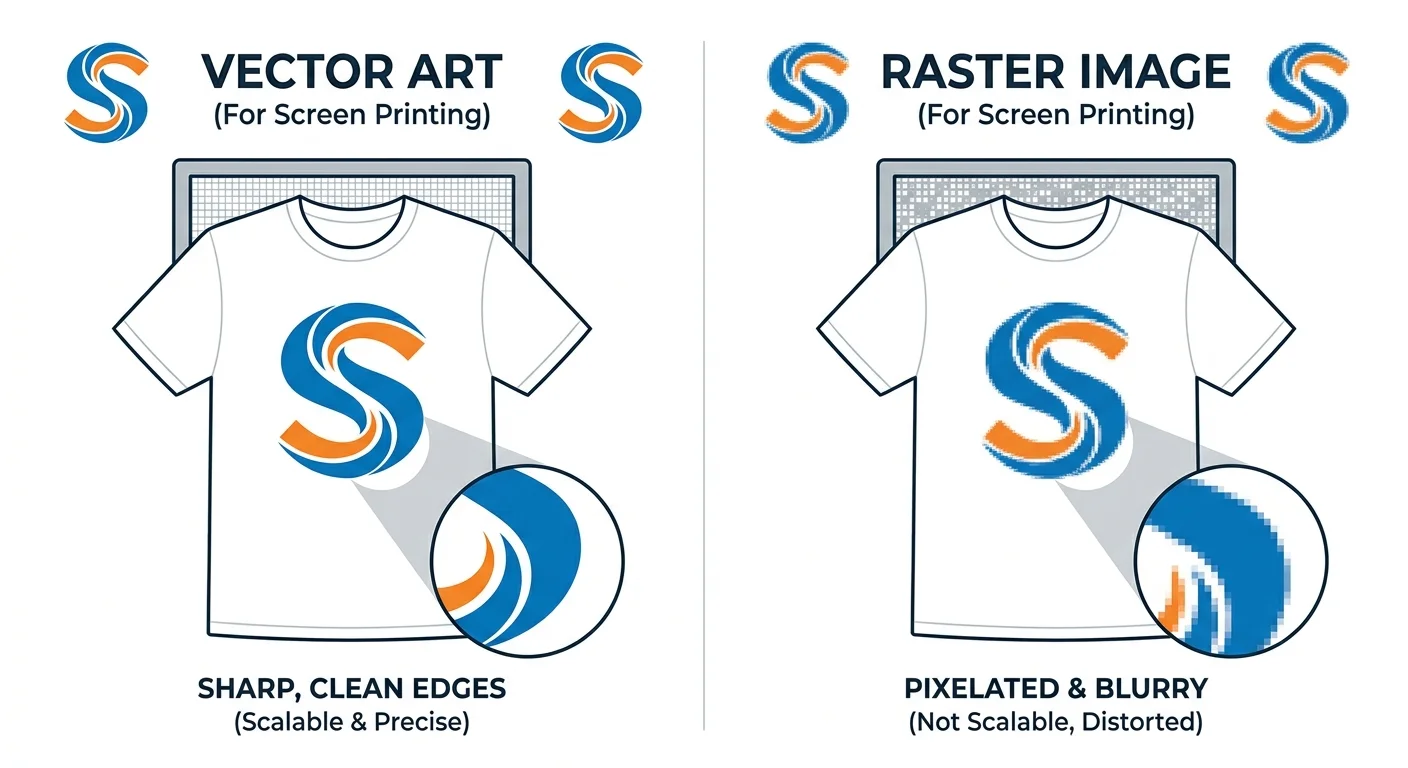
Why Vector Art Matters in Silk Screen Printing (Expert Guide to Avoid Costly Print Failures)
Introduction
In professional silk screen printing, many people believe that machines control print quality.
However, in real production workflows, designers decide print quality much earlier at the artwork stage.
Even advanced printing machines cannot fix poor artwork. Instead, issues like blurry edges, color misalignment, ink bleeding, and inconsistent results come from design preparation mistakes.
Therefore, professional print studios rely on vector artwork to maintain accuracy, consistency, and scalability.
For a basic reference on screen printing, you can check Adobe’s official guide:
https://www.adobe.com/creativecloud/design/discover/screen-printing.html
Understanding Silk Screen Printing in Professional Workflow
Silk screen printing is a stencil-based method where ink passes through a fine mesh screen onto materials such as fabric, paper, plastic, or metal.
In professional environments, teams follow a structured workflow. First, they split each design into separate color layers. Then, they assign each layer to a dedicated screen. After that, they align screens carefully for correct positioning. Finally, they control ink pressure to ensure stable output.
Because of this structure, artwork accuracy becomes very important for production quality.
Why Precision Matters in Screen Printing
Unlike digital graphics, screen printing is a physical reproduction process.
So, every detail in the artwork appears directly on the final product.
Even a small 1–2mm error can create visible color shifts, blurred edges, uneven ink flow, or rejected batches.
As a result, screen printing does not correct mistakes; it reproduces them exactly.
Vector Artwork vs Raster Artwork
Vector Artwork
Vector graphics use mathematical paths instead of pixels. Therefore, they stay sharp at any size.
They also provide clean edges, smooth shapes, and production-ready structure.
Common formats include AI, EPS, and SVG.
Raster Artwork
Raster graphics use pixels and depend on resolution.
As a result, they lose quality when scaled. They also produce blurry edges and weak separation during printing.
Common formats include JPG, PNG, and PSD.
DPI Misconception in Printing Industry
Many designers believe that 300 DPI makes a file print-ready.
However, this is not true for screen printing.
DPI only affects raster images. It does not apply to vector files because vector graphics are resolution-independent.
Therefore, professionals always prefer vector artwork in production workflows.
Why Vector Artwork Improves Print Quality
1. Clean Edge Definition
During UV exposure, artwork transfers onto screens. Vector files create sharp and clean edges without distortion.
2. Accurate Color Separation
Vector shapes stay clearly defined. So, color separation becomes accurate and predictable.
3. Full Scalability
A single vector file works for small logos, apparel prints, and large banners without quality loss.
4. Better Production Efficiency
Vector files reduce setup time, corrections, and production errors. Therefore, they improve workflow efficiency.
Color Separation in Screen Printing Workflow
Color separation is a key production step.
First, teams break the design into individual color layers. Next, they convert each layer into a separate screen. Then, they align screens using registration marks. Finally, they apply ink layer by layer.
Because of this process, vector artwork ensures accuracy and reduces errors.
Common Problems Without Vector Artwork
Without vector files, production teams face several issues:
- blurry printed output
- ink bleeding between colors
- misaligned layers
- inconsistent batch quality
- high reprint costs
In large-scale production, these issues increase cost and reduce efficiency.
Real Production Case Studies
Case 1
A team printed 500 shirts using raster artwork. The full batch failed due to blurry edges. Later, they converted the design into vector format and fixed the issue.
Case 2
A gradient design caused ink bleeding during printing. After converting it into vector flat colors, the output became clean and stable.
Case 3
Multiple sizes created scaling inconsistencies. A single vector master file solved the entire issue.
Professional Vector Conversion Workflow
Professionals follow a simple workflow:
They import artwork into Adobe Illustrator or CorelDRAW. Then, they manually trace the design using vector tools. After that, they clean paths and curves. Next, they separate colors into layers. Finally, they export the file in AI or EPS format.
You can explore Adobe Illustrator here:
https://www.adobe.com/products/illustrator.html
Professional Tools Used in Industry
Professionals use:
- Adobe Illustrator (vector creation)
- CorelDRAW (print workflows)
- RIP software (color separation processing)
Expert Printing Tips
Avoid gradients unless you use halftone techniques. Instead, use bold and simple shapes for better print stability. Also, maintain proper stroke thickness. In addition, always test print before full production.
Frequently Asked Questions
Why is vector artwork important in screen printing?
It ensures sharp, scalable, and production-ready designs without quality loss.
Can raster images be used for printing?
Yes, but they require conversion and may reduce quality.
What file formats are best for printing?
AI, EPS, and SVG work best for production.
Is 300 DPI enough for printing?
Only for raster images. It does not replace vector accuracy.
Why do professionals prefer vector files?
Because they improve consistency, reduce errors, and increase efficiency.
Conclusion
In silk screen printing, print quality starts at the design stage, not at the printing stage.
Vector artwork ensures sharp edges, accurate color separation, full scalability, and consistent production results.
Raster artwork is only suitable for preview purposes, not for professional production.
Therefore, vector files are essential for high-quality printing workflows.